扫码参数解析文档:
https://developers.weixin.qq.com/miniprogram/dev/api-backend/wxacode.getUnlimited.html
- 调试阶段可以使用开发工具的条件编译自定义参数 scene=xxxx 进行模拟
- 开发工具模拟时的 scene 的参数值需要进行 encodeURIComponent
例子:
假设 scene 参数的值为 “name=zhongwei”
encodeURIComponent("name=zhongwei")
"name%3Dzhongwei"
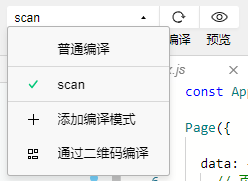
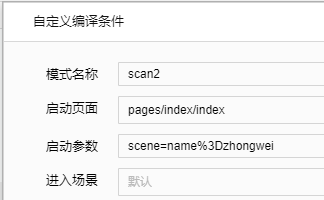
编译参数设置为
scene=name%3Dzhongwei
golang 对应的 encodeURIComponent 函数
但其实后台不需要转义,这里多余了。甚至会报错。
package main

import (
	"fmt"
	"net/url"
)

func main() {
	fmt.Println(url.QueryEscape("name=zhongwei"))        // name%3Dzhongwei
}
小程序端的解析
// onLoad
if (options.scene) {
  // 示例:qid=999135&uid=12
  // 测试编译参数:scene=qid%3D999135%26uid%3D12, 通过 encodeURIComponent 得到
  var scene = decodeURIComponent(options.scene);
  var arrPara = scene.split("&");
  var params = {};
  for (let param of arrPara) {
    arr = param.split("=");
    params[arr[0]] = arr[1];
  }
}
小程序内扫码 scanCode 如何获取 scene 值
https://developers.weixin.qq.com/community/develop/doc/000ce619f0cba888288c194af51000
需要注意 ios,android 返回的 scene 不一致问题:
- iOS表现:path: “pages/share/share?scene=sid%3D19”
- Android表现:path: “pages/share/share?scene=sid=19”
https://developers.weixin.qq.com/miniprogram/dev/api/device/scan/wx.scanCode.html
scanCode 的返回参数中有 path 值。
  goScan: function() {
    wx.scanCode({
      success: res => {
        console.log(res)
        let path = res.path;
        let deviceId = this.parseScanPath(path);
        this.getModes(deviceId);
      },
      fail: res => {
        wx.showToast({
          title: '无法解析',
          icon: 'none',  // or 'none'
          duration: 2000
        });
      },
    })
  },

  /**
   * - iOS表现:path: "pages/share/share?scene=sid%3D19"
   * - Android表现:path: "pages/share/share?scene=sid=19"
   **/
  parseScanPath: function(path) {
    let items = path.split("%3D");
    if (items.length == 2) {
      return items[1];
    } else {
      let item2s = path.split("=");
      return item2s[item2s.length - 1];
    }
  },
后台调用微信接口生成小程序码报错
{“errcode”:40129,“errmsg”:“invalid scene rid: 61a6c3a1-51a83bbe-59a73067”}
// 太阳码
// 返回图片链接
func GenQrcode(deviceId string) string {
	_url := fmt.Sprintf("https://api.weixin.qq.com/wxa/getwxacodeunlimit?access_token=%s", AccessToken)
	b := &bytes.Buffer{}
	params := map[string]string{
		"scene": url.QueryEscape(fmt.Sprintf("device_id=%s", deviceId)),
		"page":  "pages/index/index",
	}

	enc := json.NewEncoder(b)
	enc.SetEscapeHTML(false)
	enc.Encode(params)

	resp, err := http.Post(_url, "application/json; charset=utf-8", b)
	if err != nil {
		panic(err)
	}
	defer resp.Body.Close()
    ...
猜测是 json encode 之后,编码问题。但是从代码看 SetEscapeHTML(false) 没有做转义。
看来是后台 golang 这边并不需要做转义,直接传给微信服务端即可。
"scene": fmt.Sprintf("device_id=%s", deviceId),
改成这样就可以了。
{“errcode”:41030,“errmsg”:“invalid page rid: 61a6d4a5-04c98ef0-411b4fa9”}
路径没有问题,原来是小程序没有发布造成的。
发布小程序之后,等待 1 分钟,再调用小程序码生成接口,就可以成功看到太阳码了。
{“errcode”:41001,“errmsg”:“access_token missing rid: 61a6d2b7-6b48b1d9-07a048c8”}
本地小程序开发环境,没有获取 access_token 导致。
关于作者 🌱
我是来自山东烟台的一名开发者,有感兴趣的话题,或者软件开发需求,欢迎加微信 zhongwei 聊聊,或者关注我的个人公众号“大象工具”, 查看更多联系方式