之前匆匆实现了 Android 拍照功能,但测试时发现得到的图片尺寸都很小,并不是拍照时的原始尺寸。
从官方文档得知原来 ACTION_IMAGE_CAPTURE 从 Intent 得到的是图片的缩略图。
而且解决过程中,万万没想到 Android 官方文档的中文版示例代码有问题,直接用里面的代码根本运行不了。同时,里面不少翻译错误。
需要切换为英文文档,才能跑通。浪费大量时间,服气了。
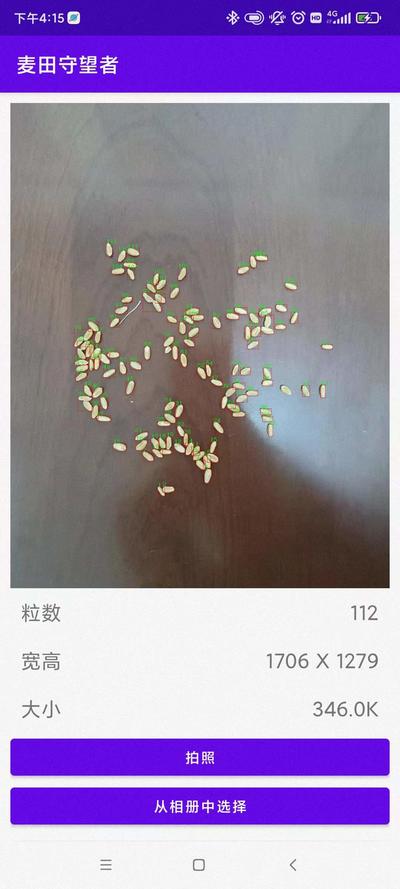
最终效果
为何直接从 Intent 得到的是缩略图
实际上 Android 官方文档写的也很详细:
val cameraIntent = Intent(MediaStore.ACTION_IMAGE_CAPTURE)
launcher.launch(cameraIntent)
这样获取到的是拍照得到照片的缩略图,而不是原图:
Android 相机应用会对返回 Intent(作为 extra 中的小型 Bitmap 传递给 onActivityResult(),使用键 “data”)中的照片进行编码
韩国小哥救命了,原来是韩国大妹子
官方文档写的实现方法,还是异常啰嗦,看起来虽然逻辑清晰,但是代码混乱。
倒是一个韩国人的实现非常简单粗暴,方便使用。
https://github.com/iruyj/AndroidLab/blob/master/c66/src/main/java/kr/hs/emirim/w2015/c66/MainActivity.kt
虽然能编译成功,但是运行时会崩溃。
Unable to get provider android.support.v4.content.FileProvider: java.lang.ClassNotFoundException
https://stackoverflow.com/questions/50624510/classnotfoundexception-didnt-find-class-android-support-v4-content-fileprovid
java.lang.IllegalArgumentException: Failed to find configured root that contains
java.lang.IllegalArgumentException: Failed to find configured root that contains /storage/emulated/0/Android/data/com.sunzhongwei.androidwheatcv/files/Pictures/JPEG_20220406_141125_132169821565699619.jpg
 D/tag: -------------------------------1111
 D/tag: -------------------------------2222
 D/tag: /storage/emulated/0/Android/data/com.sunzhongwei.androidwheatcv/files/Pictures/JPEG_20220406_141125_132169821565699619.jpg
https://stackoverflow.com/questions/42407486/java-lang-illegalargumentexception-failed-to-find-configured-root-that-contains
错误的配置为:
<external-files-path name="my_images" path="Android/data/com.sunzhongwei.androidwheatcv/files/Pictures/" />
实际上正确为:
<?xml version="1.0" encoding="utf-8"?>
<paths xmlns:android="http://schemas.android.com/apk/res/android">
    <external-files-path name="my_images" path="Pictures" />
</paths>
日了,Android 官网的中文文档有毒!!!
// 英文版
<external-files-path name="my_images" path="Pictures" />

// 中文版
<external-files-path name="my_images" path="Android/data/com.example.package.name/files/Pictures" />
中文版几年没维护了。。。好歹英文版还是维护的。。。以后再也不敢看中文文档了,即便是官方的。。。。
运行得到的图片路径:
2022-04-06 22:21:38.427 15623-15623/com.sunzhongwei.androidwheatcv D/tag: /storage/emulated/0/Android/data/com.sunzhongwei.androidwheatcv/files/Pictures/JPEG_20220406_142138_1107410492385140715.jpg
2022-04-06 22:21:38.427 15623-15623/com.sunzhongwei.androidwheatcv D/tag: content://com.sunzhongwei.androidwheatcv.fileprovider/my_images/JPEG_20220406_142138_1107410492385140715.jpg
完整可运行的代码
AndroidManifest.xml
<provider
	android:name="androidx.core.content.FileProvider"
	android:authorities="com.sunzhongwei.androidwheatcv.fileprovider"
	android:exported="false"
	android:grantUriPermissions="true">
	<meta-data
		android:name="android.support.FILE_PROVIDER_PATHS"
		android:resource="@xml/file_paths" />
</provider>
src/main/res/xml/file_paths.xml
<?xml version="1.0" encoding="utf-8"?>
<paths xmlns:android="http://schemas.android.com/apk/res/android">
    <external-files-path name="my_images" path="Pictures" />
</paths>
activity.kt
var filePath =""
val fileLauncher : ActivityResultLauncher<Intent> = registerForActivityResult(
	ActivityResultContracts.StartActivityForResult()){
	val option = BitmapFactory.Options()
	option.inSampleSize = 3
	val bitmap = BitmapFactory.decodeFile(filePath, option)
	bitmap?.let{
		handleCameraImage(bitmap)
	}
}

val btnTakePicture = findViewById<Button>(R.id.btnTakePicture)
btnTakePicture.setOnClickListener {
	Log.d("tag", "-------------------------------1111")
	// intent to open camera app
	//val cameraIntent = Intent(MediaStore.ACTION_IMAGE_CAPTURE)
	//launcher.launch(cameraIntent)
	val timeStamp = SimpleDateFormat("yyyyMMdd_HHmmss").format(Date())
	val storageDir = getExternalFilesDir(Environment.DIRECTORY_PICTURES)
	val file = File.createTempFile(
		"JPEG_${timeStamp}_",
		".jpg",
		storageDir
	)
	Log.d("tag", "-------------------------------2222")

	filePath = file.absolutePath
	Log.d("tag", filePath)
	val uri = FileProvider.getUriForFile(
		this,
		"com.sunzhongwei.androidwheatcv.fileprovider",
		file
	)
	Log.d("tag", uri.toString())
	val intent = Intent(MediaStore.ACTION_IMAGE_CAPTURE)
	intent.putExtra(MediaStore.EXTRA_OUTPUT, uri)
	fileLauncher.launch(intent)
}
参考
- https://stackoverflow.com/questions/41038027/captured-image-returns-small-size?rq=1
- https://developer.android.com/training/camera/photobasics.html#TaskPath