需求场景
由于本地开发环境调试时,不允许使用真实的 AdMob 广告 ID,只能使用 AdMob 官方提供的测试 ID。所以,带来了一个麻烦,就是每次编译 Release 版本时,需要手动将 layout 文件中的广告 ID 做手动替换。费时费力,且容易忘记。Google 了一下,找到一个非常好的解决方法。
创建不同的 source set
source set 中文名暂且称为资源集合吧。
默认情况下,Android Studio 只创建了 main source set。但是,实际上,Gradle 能够自动识别 debug 和 release source set。只要你将 debug / release 目录放到与 app/src/main 的平级目录。如此:
- 本地模拟器 debug 调试时,就会自动使用 debug 目录下的资源
- 发布时,自动使用 release 或者 main 中的资源 (没有 release 的情况下,会使用 main)。而我的需求场景,并不需要建立 release 目录。
debug 跟 release 的 strings.xml 是否需要全量拷贝 main 下的。
并不需要。
I should also add that if you have a string which isn’t defined in either of the debug or the release folder that it will fallback to your main folder.
如果 debug 目录中不存在你想获取的资源,程序会自动到 main 目录中查找。
参考:
https://stackoverflow.com/questions/36039848/android-separate-string-values-for-release-and-debug-builds
添加 debug 目录的方法
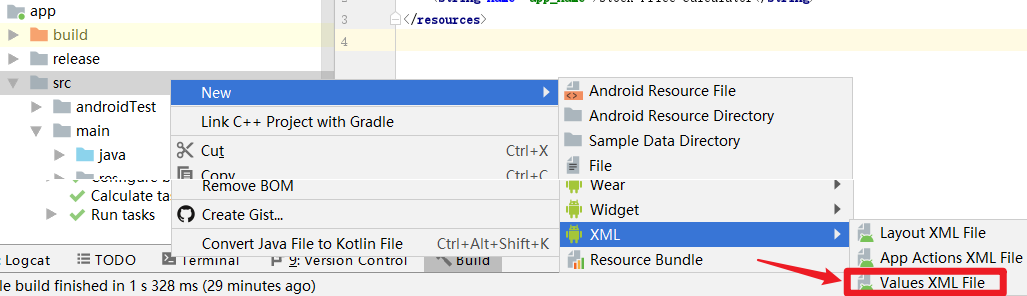
Android Studio 代码目录由 Android 视图切换为 Project 视图。右键 app/src - new - XML Values XML File。
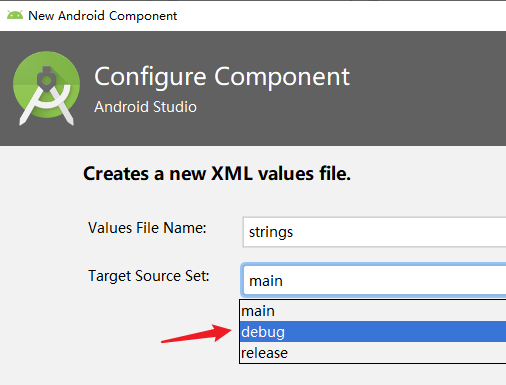
Target Source Set 下拉选择 debug。(可见,默认已经支持了 debug / release)
这时切换到 Android 视图,可以发现出了多语言版本的 strings.xml 还多了一个 debug 版本的 strings.xml。
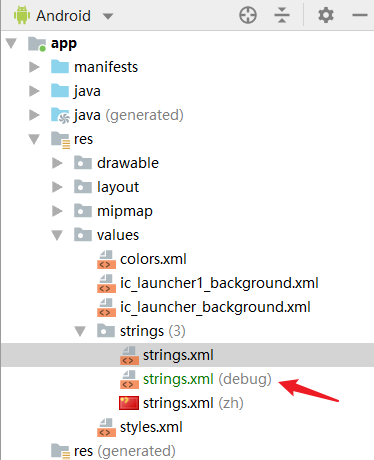
实际新增文件地址为:
new file: app/src/debug/res/values/strings.xml
参考:
https://developer.android.com/studio/build/build-variants#sourcesets
设置 debug / main 不同的广告 ID
main 中使用真实的 ad unit id:
<string name="ad_unit_id" translatable="false">ca-app-pub-xxx/xxx</string>
debug 中使用测试的 ad unit id:
<string name="ad_unit_id" translatable="false">ca-app-pub-3940256099942544/6300978111</string>
然后在广告单元代码中读取字符串变量
ads:adUnitId="@string/ad_unit_id"
这样就可以不同情况下自动切换广告 ID 了。再也不怕脑子不好使了!