之前用 Trello 及 Tapd 在进行项目管理,可能担心未来的收费问题,或是数据安全性隐患,领导让尝试在公司服务器上搭建一套基于 Ruby RoR 开发的开源项目管理系统 Redmine。
整体上搭建过程还是有点繁琐,加上对 Rails 不熟悉,大概用了半天时间。实际上很多操作是可以自动化的。
界面效果
里面的工时统计,及甘特图非常实用。
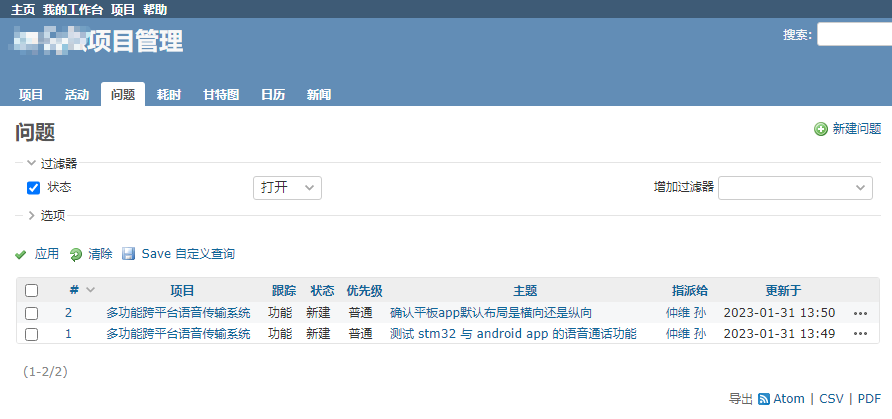
UI 风格上有点类似 Trac,比较 old school 。。。
服务器环境
CentOS 8.3
官方安装文档
https://www.redmine.org/projects/redmine/wiki/RedmineInstall
版本
Redmine 目前最新版本 5.0.4 (2022-12-01)
MySQL 版本
官方推荐 MySQL 5.6 以上版本,但没有说 8.0 是否支持。那就是 5.7 最合适了。
确认本机 MySQL 版本
> /usr/local/mysql/bin/mysqld --version
/usr/local/mysql/bin/mysqld  Ver 5.7.30 for Linux on x86_64 (Source distribution)
建库
CREATE DATABASE redmine CHARACTER SET utf8mb4;
CREATE USER 'redmine'@'localhost' IDENTIFIED BY 'my_password';
GRANT ALL PRIVILEGES ON redmine.* TO 'redmine'@'localhost';
下载 Redmine
https://www.redmine.org/projects/redmine/wiki/Download
例如:
wget https://www.redmine.org/releases/redmine-5.0.4.tar.gz
tar xvzf redmine-5.0.4.tar.gz
只有 3M 大,良心。
配置文件
cp config/database.yml.example config/database.yml
修复 production 部分的数据库账号密码。
Ruby 版本要求
Redmine 版本 5.0 支持的 Ruby 版本:
- Ruby 2.5, 2.6, 2.7, 3.0, 3.1
- Rails 版本 6.1
安装参考:CentOS 8 安装 Ruby 3
生成 random key
bundle exec rake generate_secret_token
自动建表
RAILS_ENV=production bundle exec rake db:migrate
导入默认数据
RAILS_ENV=production REDMINE_LANG=zh bundle exec rake redmine:load_default_data
REDMINE_LANG 参数设置了语种,这里用了中文 zh,也可以用法语 fr,或者英文 en。
Unicorn
Use one of the many other guides in this wiki to setup redmine to use either Passenger (aka mod_rails), FCGI or a Rack server (Unicorn, Thin, Puma, hellip;) to serve up your redmine.
参考:
https://ericmathison.com/blog/how-to-install-redmine-on-ubuntu-16-04-with-nginx-and-unicorn
yum install openssl-devel libcurl-devel
gem install unicorn
unicorn 配置文件参考上面链接里的,修改一下就行。
但是,unicorn 执行后,默认并没有后台运行,还是配置个 systemd 比较方便。
unicorn_rails -E production -c config/unicorn.rb
实际上加上个参数 D 就行。
unicorn_rails -D -E production -c config/unicorn.rb
确认一下是否已经后台运行:
ps axuw | grep unicorn
root      652009 28.7  4.3 395836 161236 ?       Sl   13:15   0:03 unicorn_rails master -D -E production -c config/unicorn.rb
root      652011  0.0  4.1 395836 153048 ?       Sl   13:15   0:00 unicorn_rails worker[0] -D -E production -c config/unicorn.rb
root      652013  0.0  4.1 395836 153456 ?       Sl   13:15   0:00 unicorn_rails worker[1] -D -E production -c config/unicorn.rb
root      652014  0.0  4.1 395836 152996 ?       Sl   13:15   0:00 unicorn_rails worker[2] -D -E production -c config/unicorn.rb
root      652017  0.0  4.1 395836 153460 ?       Sl   13:15   0:00 unicorn_rails worker[3] -D -E production -c config/unicorn.rb
Nginx 配置
upstream unicorn_server {
    # This is the socket we configured in unicorn.rb
    server unix:/somepath/redmine/tmp/sockets/unicorn.sock
    fail_timeout=0;
}

server {
    listen 80;
    server_name redmine.sunzhongwei.com;
    location / {
        proxy_set_header X-Forwarded-For $proxy_add_x_forwarded_for;
        proxy_set_header Host $http_host;
        proxy_redirect off;
            if (!-f $request_filename) {
                proxy_pass http://unicorn_server;
                break;
            }
        }
}
默认的账号密码
admin admin
需要注意的配置
- 将项目默认设置为非公开
- 设置用户需要登录后才能查看内容。默认是访客都能看到网站内容
- 禁止自注册
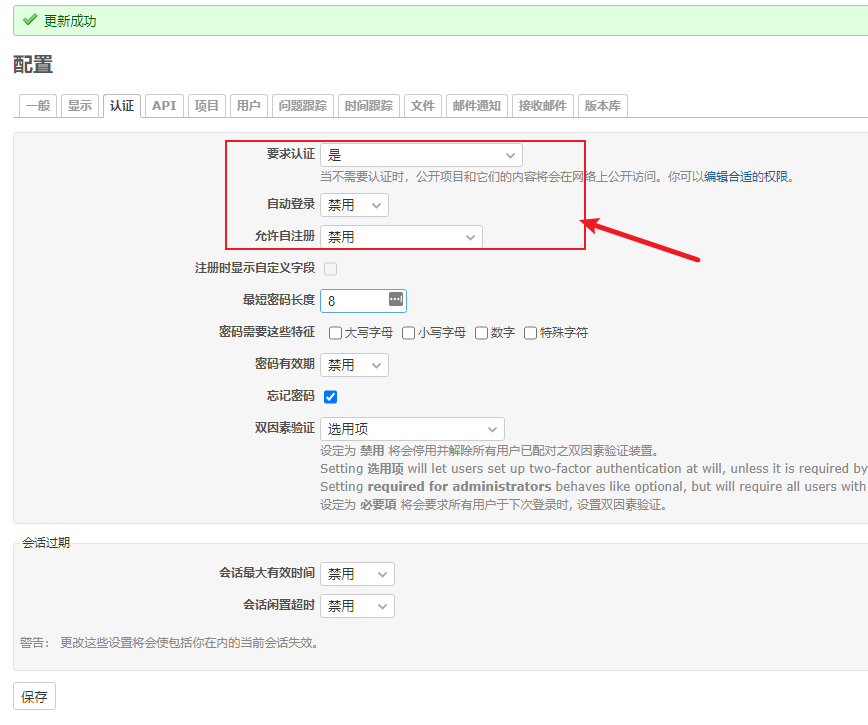
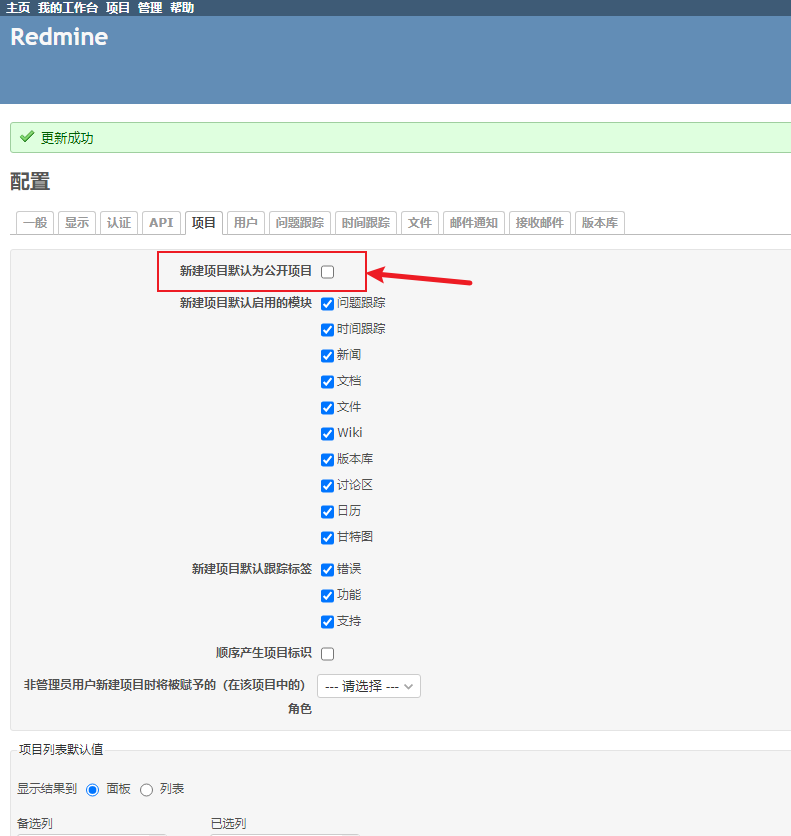
依赖的版本问题
搭建过程中,尝试了一下 passenger,但是感觉不如 unicorn 部署方便,就抛弃了。
但是由于偷懒,没有删除 passenger,导致启动 unicorn 时报错:
unicorn_rails -E production -c config/unicorn.rb
运行之后,就立即退出了。终端里也没有显示错误日志,在 log/unicorn.stderr.log 中找到了错误信息:
Refreshing Gem list
/usr/share/gems/gems/bundler-2.2.22/lib/bundler/runtime.rb:302:in check_for_activated_spec!': You have already activated rack 3.0.4.1, but your Gemfile requires rack 2.2.6.2. Prepending bundle exec` to your command may solve this. (Gem::LoadError)
解决方法:
gem uninstall passenger
gem uninstall rack -v  3.0.4.1